.png?width=250&height=45&name=Full_logo_dark%20(1).png)
A Legitimate Interest Assessment — or LIA — is a legal document that records your basis for sending marketing emails under GDPR. Under the legitimate interest ground, you need to demonstrate that you've weighed your marketing purposes against your customers' privacy rights, and that the balance is in your favour. Dataships generates this assessment for you. Your job is to read through it and sign off.
Once you mark the LIA complete, you have a documented legal basis on record — something regulators and auditors may ask to see.
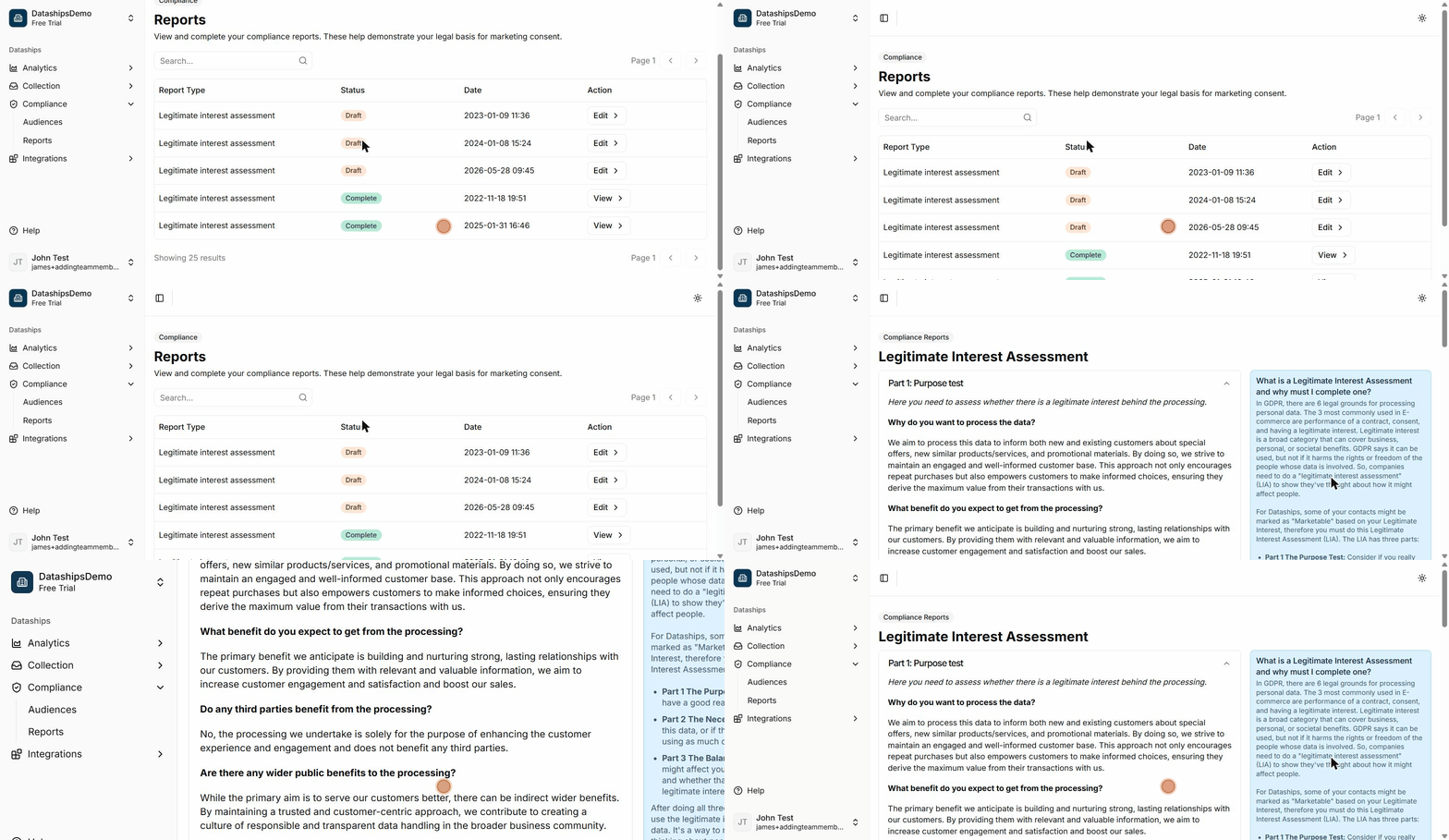
Finding your compliance reports
In the left sidebar, go to Compliance and select Reports. You'll see a table listing your available compliance reports.
Reading the reports list
The table has four columns:
- Report Type — The name of the compliance document. For most merchants, this will be Legitimate Interest Assessment.
- Status — Either a green Complete badge (you've signed off) or a yellow Draft badge (not yet completed).
- Date — The date the report was completed or last updated.
- Action — A View button if the report is complete, or an Edit button if it's still in draft. Both open the full report.
Opening and reading your LIA
Click Edit (or View if already complete) to open the Legitimate Interest Assessment. The report is laid out with an information panel on the right explaining the three-part test, and four accordion sections on the left containing the pre-written assessment text.
Dataships has filled in all the content. You don't need to write anything — just read through each section to make sure you're comfortable with it.
What each section covers
- Part 1 — Purpose test: Explains the specific marketing purpose you're relying on legitimate interest for, and confirms it's a genuine, legitimate business objective.
- Part 2 — Necessity test: Confirms that processing your customers' contact data for this purpose is necessary and that there's no less privacy-invasive way to achieve the same result.
- Part 3 — Balancing test: Weighs your interests as a business against your customers' reasonable privacy expectations, taking into account the nature of the data and the likely impact on shoppers.
- Making the decision: Summarises the outcome of the three-part test and records the overall conclusion that legitimate interest applies.
Completing the assessment
Once you've read through all four sections, scroll to the bottom of the report. You'll see a prompt: "By clicking I agree I have reviewed the report and am satisfied with its contents."
Click I agree to mark the assessment complete. The page will update to show a confirmation — "Assessment Completed" — along with your name and the date you signed off. The report's status in the list will change from Draft to Complete.
What "Complete" and "Draft" mean
- Draft — The report has been generated but you haven't yet reviewed and signed off. Your LIA is not on record as completed.
- Complete — You've reviewed the report and clicked "I agree". The completion is timestamped with your name, giving you a documented record of when the assessment was carried out.
Frequently asked questions
Do I need to fill anything in?
No. Dataships pre-populates the entire assessment based on how your store uses consent data. You only need to read through the content and click I agree if you're satisfied with it. If anything looks incorrect, reach out to Dataships support before completing it.
What happens if I don't complete the LIA?
Your report will remain in Draft status. While this doesn't immediately affect how your store operates, it means you don't yet have a signed, timestamped record of your legal basis for marketing consent. Under GDPR, being able to demonstrate your lawful basis is a compliance requirement — so it's worth completing this as soon as possible.
Can I un-complete a report?
No — once a report is marked complete, that status is locked. The record is intentionally permanent, since it documents a specific legal decision made at a point in time. If your circumstances change and you believe the assessment needs to be revisited, contact Dataships support.