.png?width=250&height=45&name=Full_logo_dark%20(1).png)
Your privacy policy URL and privacy email appear in the Dataships consent widget shown to every shopper at checkout. Getting these right is a compliance requirement — a broken link or wrong contact address affects every consent interaction your store captures.
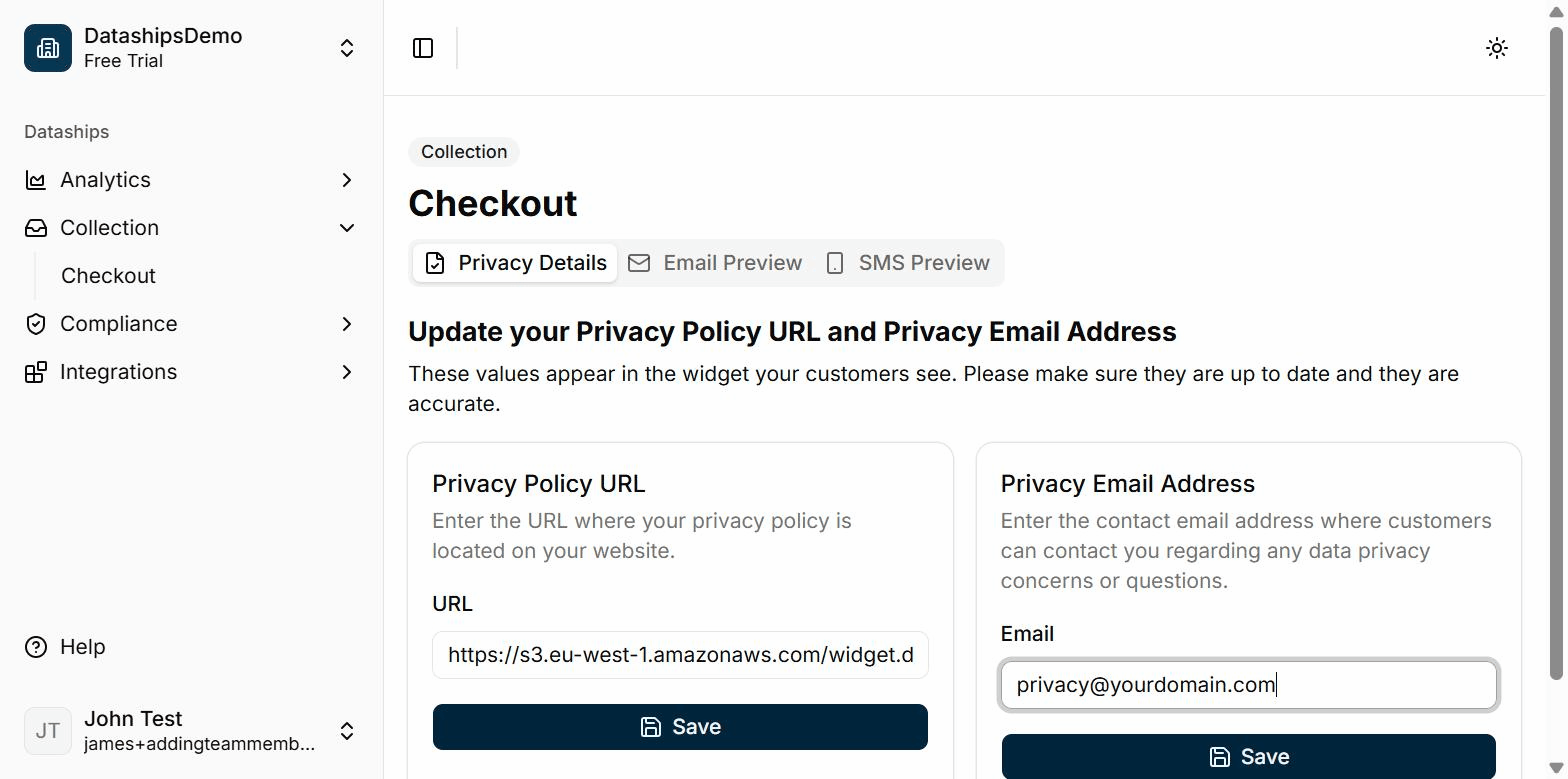
Finding the screen
Go to Collection > Checkout in the left sidebar. The Privacy Details screen loads by default. You can also reach it during onboarding at Step 4.
Setting your privacy policy URL
This is the URL where your privacy policy lives on your website. Dataships displays it as a link in the consent widget so shoppers can review how their data is used before consenting.
- In the Privacy Policy URL card, enter your privacy policy URL in the URL field.
- Click Save.
- You'll see a toast confirmation: "Privacy policy URL saved."
If you try to save with the field empty, you'll see an inline error: "Privacy Policy URL is required." The field also validates URL format.
Setting your privacy email
This is the contact address shoppers can use to ask questions about their data — access requests, deletion, opt-out. Many privacy frameworks require a data subject contact route at the point of consent.
- In the Privacy Email Address card, enter your contact email in the Email field.
- Click Save.
- You'll see a toast confirmation: "Privacy email saved."
If you leave the field empty, you'll see: "Privacy email is required."
Note: The two cards save independently. Saving your URL does not save your email, and vice versa — click Save in each card separately.
During onboarding
If you're going through onboarding, you'll see a progress bar at the top: 4/6. The Next button is disabled until both fields have been saved. Once both are saved, click Next to continue to the next onboarding step.
Frequently asked questions
Where exactly do these appear in the widget?
Your privacy policy URL appears as a clickable link in the consent widget at checkout — shoppers can tap it to read your policy before agreeing to marketing. Your privacy email is the contact address displayed for shoppers who want to exercise data rights (such as requesting deletion or opting out).
What happens if I use the wrong email?
Shoppers who try to contact you about their data privacy rights will reach the wrong inbox — or no inbox at all. This creates a compliance gap under frameworks like GDPR, which require a functioning contact route at the point of consent. Use an email address you actively monitor.
Can I update these later?
Yes. Go to Collection > Checkout at any time, update either field, and click Save. Changes take effect immediately for new consent interactions.