.png?width=250&height=45&name=Full_logo_dark%20(1).png)
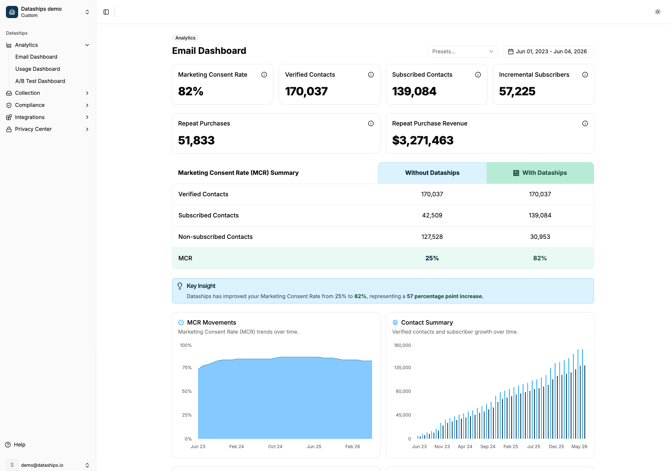
Your analytics dashboard is the clearest view of what Dataships is actually doing for your store. It shows you how many contacts you've collected, how many of those came directly from Dataships (the ones you wouldn't have had otherwise), and how much revenue those contacts have gone on to generate. If you ever need to answer the question "is Dataships working?" — this is where you look.
Finding the dashboard
In the left-hand navigation, click Analytics and then Email Dashboard. You'll land on the main analytics view for your email channel.
Filtering by date range
At the top of the dashboard you'll find two date controls. Use these together to focus on any period you care about.
- Preset dropdown — quick options: All Time, This Month, Previous Month, Previous 3 Months, Previous 6 Months, Previous 12 Months.
- Custom date picker — click the date range field to open a calendar and pick any start and end date. You can't select future dates.
Both controls are greyed out when an A/B test is running — see A/B test active state below for why.
The KPI cards
Six cards sit at the top of the dashboard. These are the numbers that matter most.
Marketing Consent Rate (MCR)
The percentage of checkout visitors processed by Dataships who consented to receive your marketing. This is your headline measure of how well the consent experience is converting — a higher MCR means more of your checkout traffic is becoming marketable contacts. The MCR Summary Table below breaks this down further.
Verified Contacts
The total number of contacts Dataships has processed at checkout, each with a verified record of their consent status. A contact being "verified" means Dataships has a clear record of exactly what they were shown and what they did — it doesn't automatically mean they opted in. This is your total processed volume.
Subscribed Contacts
Contacts who are opted in to receive your marketing after being processed by Dataships. This includes both brand-new subscribers and people who were already subscribed before they checked out. Think of it as everyone in your marketable list who has touched Dataships.
Incremental Subscribers
The contacts who subscribed to your marketing because of Dataships — people who wouldn't have subscribed under your old checkout setup. This is the number that represents the direct value Dataships is adding to your list. If someone was already subscribed before Dataships processed them, they aren't counted here.
Repeat Purchases
The number of repeat purchase orders placed by your incremental subscribers since they first subscribed via Dataships. First purchases aren't counted — this measures the ongoing revenue behaviour of the contacts Dataships unlocked for you.
Repeat Purchase Revenue
The total revenue from those repeat purchases. This is the commercial story of what your incremental subscribers are worth over time — the money that came in from orders placed by contacts Dataships added to your list.
The MCR Summary Table
Below the KPI cards you'll find the Marketing Consent Rate (MCR) Summary table. This is a side-by-side comparison of what your consent rate looked like before and after Dataships.
- Without Dataships (shown in blue) — your baseline: how contacts and consent would have looked using a standard checkout setup, without Dataships optimising the experience.
- With Dataships (shown in green) — your actual results: verified contacts, subscribed contacts, non-subscribed contacts, and the resulting MCR percentage.
The rows in the table — Verified Contacts, Subscribed Contacts, Non-subscribed Contacts, and MCR (%) — let you see exactly where the difference is coming from.
The Key Insight alert
When your MCR with Dataships is higher than it would have been without it, a Key Insight alert appears below the table. It tells you exactly how many percentage points Dataships has improved your consent rate. If you don't see it, it means the comparison data isn't showing an improvement in the current date range.
The charts
Four charts sit below the MCR table, laid out in a two-column grid. They show you how your numbers have moved over time — hover over any bar or line to see the exact value for that month.
- MCR Movements — an area chart showing how your Marketing Consent Rate has trended month by month. Look for consistent upward movement as a sign the consent experience is improving over time.
- Contact Summary — a bar chart showing your verified contacts and subscriber growth side by side each month. Good for understanding the overall scale of what Dataships is processing.
- Incremental Subscribers — a bar chart showing how many net-new subscribers Dataships added each month. This is your list-growth story from Dataships alone.
- Repeat Purchases — a bar chart showing the revenue from repeat purchases by incremental subscribers each month. Watch this one to understand the compounding value of your growing list.
The Monthly Breakdown table
Below the charts you'll find the Monthly Breakdown table — a row-by-row view of your numbers for each calendar month in the selected date range.
The columns are:
- Month — the calendar month.
- Verified Contacts — contacts processed by Dataships that month.
- MCR (%) — your Marketing Consent Rate for that month.
- Subscribed Contacts — opted-in contacts that month.
- Incremental Subscribers — net-new subscribers added by Dataships that month.
- Repeat Purchases — repeat purchase orders from incremental subscribers that month.
- Repeat Purchase Revenue — the revenue from those repeat purchases (shown in bold green).
A Total row at the bottom sums every column across the full date range.
The Usage Dashboard
In addition to the Email Dashboard, there's a separate Usage Dashboard — find it under Analytics → Usage Dashboard in the navigation. Where the Email Dashboard is about outcomes (subscribers, revenue), the Usage Dashboard is about activity — what Dataships is actually doing behind the scenes on your account.
The three KPI cards
- First Time Verified Contacts — contacts that Dataships has processed for the first time in the selected period. These are brand-new entries in your consent records.
- Updates to Existing Verified Contacts — contacts Dataships already had on record who returned to checkout and got an updated consent record (for example, if their status or details changed).
- Updates made by Dataships — the total number of data relationship changes Dataships made during the period, including syncing consent status to your marketing platform.
The "How It Works" section
Below the KPIs you'll find a three-step walkthrough of how contacts move through Dataships — from your checkout, through consent processing, to your marketing platform. It's a useful orientation if you're new to the platform or want to understand the flow at a high level.
A/B test active state
If Dataships is running an A/B test on your account, the Email Dashboard replaces the normal view with a message that reads: "A/B test is currently running. Your Sales rep will schedule a check-in once the results are ready." The date range filter is disabled during this period. This is expected behaviour — your results will be available once the test completes and your rep walks you through the findings.
FAQ
What's the difference between Verified Contacts and Subscribed Contacts?
Verified Contacts is the total count of everyone Dataships has processed at your checkout — regardless of whether they opted in or not. Subscribed Contacts is the subset of those who are actually opted in to receive your marketing. Think of Verified as your processed volume and Subscribed as your marketable list within that group.
What are Incremental Subscribers?
These are the contacts who subscribed to your marketing specifically because Dataships was there. If someone was already subscribed before Dataships processed them, they don't count. Incremental Subscribers represent the direct, measurable impact Dataships has had on your list growth — the new subscribers you wouldn't have had otherwise.
How is Repeat Purchase Revenue calculated?
It's the total revenue from purchases made by your incremental subscribers after their first order. Only repeat purchases count — the first transaction isn't included. This measures the downstream commercial value of the contacts Dataships added to your list, not just the initial acquisition.